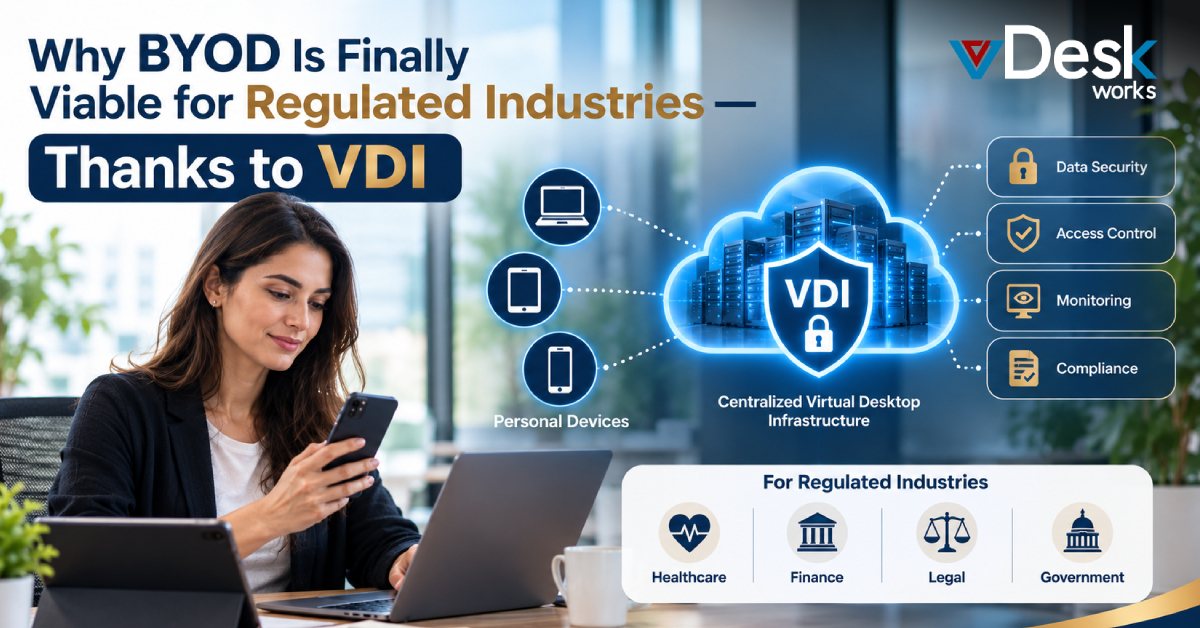
Bring Your Own Device (BYOD) has always been attractive to businesses. Employees already have laptops, tablets, and smartphones that they know how to use, while organizations can support flexible and remote working without supplying every employee with additional hardware.
But for regulated industries, convenience has traditionally come with a major concern: data control.
Healthcare organizations handle patient information. Financial companies manage sensitive customer and payment data. Legal organizations work with confidential documents, while government agencies may deal with highly restricted information.
Allowing this information to reach unmanaged personal devices creates questions about security, privacy, access, monitoring, and compliance.
So, can businesses really combine BYOD with strict security requirements?
Increasingly, VDI for BYOD is providing a way to make that possible.
What Actually Changes When VDI Is Added to BYOD?
Traditional BYOD generally means that business applications and information operate directly on an employee's personal device.
VDI changes the architecture.
Instead of treating the personal laptop or tablet as the location where corporate applications and data live, the organization can provide access to a centrally hosted virtual desktop.
The employee's device becomes primarily an access point.
Applications can run inside the virtual environment, while sensitive business information can remain within the organization’s-controlled infrastructure.
This distinction is important because it separates the device an employee owns from the environment where corporate work is performed.
Can VDI Reduce the Risk of Data Being Stored on Personal Devices?
Yes, depending on the deployment and configuration.
One of the strongest arguments for Secure BYOD is reducing the amount of corporate information stored locally.
For example, if an employee uses a personal laptop to access a virtual desktop, sensitive files can remain within the hosted environment rather than being downloaded to the laptop's local drive.
This can reduce exposure if the device is:
- Lost or stolen
- Shared with another person
- Infected with malware
- Replaced or sold
- Used on an unsecured network
However, organizations should not assume that VDI eliminates endpoint risk. Devices still need appropriate authentication, security controls, and policies.
Does VDI Eliminate the Need for Device Management?
Not completely.
Traditional Mobile Device Management can involve managing or monitoring aspects of an employee's personal device, which may create privacy concerns.
VDI can reduce the need to control the entire personal device because the organization can focus more heavily on securing the virtual workspace and controlling access to it.
Administrators can establish policies around authentication, session access, application permissions, and data movement.
This creates a more targeted approach:
Protect the corporate environment without unnecessarily taking control of the employee's personal device.
How Can VDI Help Regulated Businesses Control Data?
Centralization is one of the biggest advantages of VDI.
Instead of sensitive applications and files being distributed across hundreds or thousands of personal devices, the organization can keep the working environment within a controlled infrastructure.
This can make it easier to implement:
- Centralized access policies
- Encryption
- Multi-factor authentication
- Role-based permissions
- Session controls
- Application restrictions
- Centralized patching
- User activity logging
For regulated organizations, centralized control can also make security processes more consistent.
Can VDI Support Compliance Requirements?
VDI can support compliance strategies, but it is important not to confuse security capability with compliance itself.
Frameworks and regulations such as HIPAA, PCI DSS, and GDPR involve broader organizational responsibilities. A virtual desktop platform cannot automatically make a company compliant.
Instead, VDI can provide technical controls that support requirements related to access management, data protection, auditing, and security.
Organizations still need appropriate policies, risk assessments, retention procedures, incident-response processes, contractual controls, and governance.
The goal should therefore be to use VDI as part of a wider compliance architecture.
What Happens If an Employee Loses a Personal Laptop?
This is where the difference between traditional BYOD and VDI-powered BYOD becomes particularly important.
With traditional BYOD, business files may be stored locally, cached by applications, or synchronized with personal storage.
With a properly configured virtual desktop, the organization's data can remain within the centralized environment.
If the laptop disappears, administrators can disable the user's virtual desktop access without physically retrieving the device.
This can also make employee offboarding easier. Rather than attempting to locate corporate files across personal hardware, administrators can revoke access centrally.
Can Employees Use BYOD From Anywhere?
This is another reason VDI for BYOD is becoming relevant as businesses adopt hybrid work.
Employees may need to work from home, while traveling, from a client location, or from another office.
A centrally hosted virtual desktop can provide a consistent work environment across supported devices.
For regulated businesses, remote access should still be protected through strong authentication, encrypted connections, appropriate access policies, and monitoring.
The location of the employee's device does not eliminate the need for security—it simply changes how security must be implemented.
How Does vDeskWorks Make VDI-Based BYOD More Practical?
Businesses exploring VDI for BYOD can consider platforms such as vDeskWorks to provide centrally managed virtual desktop environments across supported devices.
The vDeskWorks approach allows employees to access a virtual workspace without requiring the organization to treat every personal laptop or tablet as a fully managed corporate endpoint.
Centralized desktop management can help businesses control applications, user access, and virtual workspaces from a more unified environment.
For regulated organizations, the important step is to configure the environment around their specific security and compliance requirements. This includes reviewing authentication, encryption, data storage, access policies, session controls, logging, backup, and disaster recovery.
vDeskWorks can therefore serve as an infrastructure component in a broader Secure BYOD strategy rather than being viewed as a standalone compliance solution.
Is BYOD Now Practical for Regulated Industries?
The answer increasingly depends on how BYOD is implemented.
The traditional model, allowing sensitive business data and applications to operate directly on unmanaged personal devices, creates significant challenges for organizations with strict security requirements.
VDI changes that model by separating the employee's physical device from the centralized corporate workspace.
For healthcare, finance, legal, government, and other regulated sectors, this can create a more controlled way to support workforce flexibility while reducing unnecessary distribution of sensitive information.
Final Thoughts
BYOD does not have to mean giving up control over corporate data. With Virtual Desktop Infrastructure, businesses can create a separation between the employee's personal hardware and the environment where sensitive work takes place.
That makes BYOD for Regulated Industries a more practical conversation than it was in the past.
VDI can support centralized data management, controlled access, remote work, and stronger endpoint-risk management while allowing employees to use familiar devices.
For organizations considering this approach, vDeskWorks can be evaluated as part of a broader VDI and DaaS strategy. The key is to design the environment around the organization's regulatory obligations, security policies, applications, and workforce requirements. Schedule a live demo online at www.vdeskworks.com/live-demo-client.
Ultimately, the future of BYOD in regulated industries is not about trusting personal devices with sensitive data. It is about using technology such as VDI to create a secure boundary around the corporate workspace—even when the hardware belongs to the employee.
 Emma Carson