For years, Remote Desktop Protocol (RDP) has provided businesses with a convenient way to let employees remotely access Windows desktops and applications.
But business environments have changed.
Employees now work from home, offices, coworking spaces, and different locations. Companies also depend on cloud applications, personal devices, remote access, and distributed teams.
At the same time, cybercriminals have become more aggressive.
An exposed remote-access service, outdated server, stolen credential, or poorly configured firewall can become an entry point into a corporate environment.
This raises an important question:
Is traditional RDP and on-premises infrastructure still the safest way to support today's distributed workforce?
For many businesses, it may be time to reconsider the model.
What Makes Legacy RDP a Security Concern?
RDP is not inherently insecure. The problem often comes from how legacy RDP environments are exposed and managed.
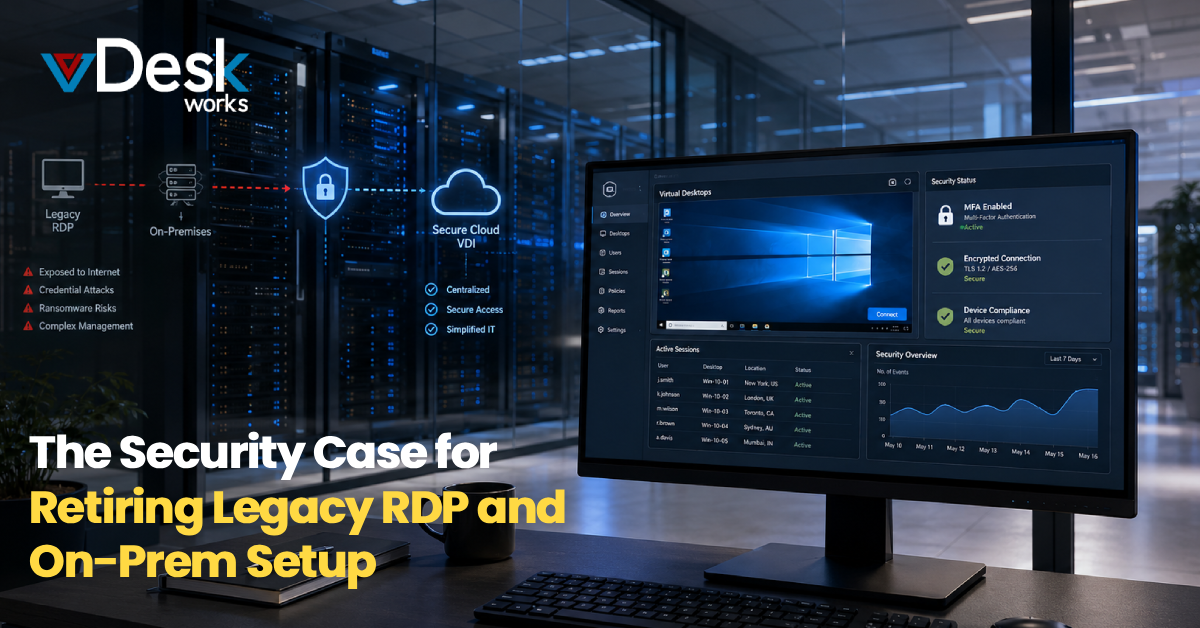
Internet-facing RDP services are frequently targeted by automated scanning, credential attacks, and other malicious activity. Vulnerabilities in older Microsoft remote desktop implementations have also demonstrated how serious remote-access weaknesses can become.
A compromised account can potentially provide an attacker with access to a remote machine and, depending on network architecture and privileges, create opportunities for further compromise.
Common concerns include:
- Brute-force and credential attacks
- Stolen passwords
- Unpatched vulnerabilities
- Ransomware
- Excessive network access
- Weak remote-access configurations
- Limited visibility into user activity
This is why Legacy RDP Security should be evaluated as part of a broader security architecture rather than simply assuming that a VPN or firewall makes remote access safe.
Why Is RDP Port 3389 Such a Concern?
Many organizations associate RDP with TCP port 3389.
The port itself is not the vulnerability. The concern is that an openly exposed remote service can be discovered by automated internet scanning.
Attackers do not necessarily need to know that a specific company uses RDP. Automated tools can scan large numbers of IP addresses looking for exposed services.
If the service is protected only by usernames and passwords, attackers may attempt credential stuffing or brute-force attacks.
So, the question becomes:
Why expose a remote desktop service directly to the internet when modern architectures can reduce that exposure?
Can Legacy RDP Become a Ransomware Entry Point?
Unfortunately, remote access credentials can be valuable to ransomware operators.
Once attackers gain access to a remote system, they may attempt to escalate privileges, move laterally across the network, disable security tools, and deploy malicious software.
The risk becomes greater when remote desktop servers have broad access to internal systems.
This is one reason businesses should move toward architectures based on least privilege, MFA, network segmentation, endpoint controls, and continuous monitoring.
What Is the Problem with Traditional On-Premises Infrastructure?
The challenge is not limited to RDP.
Traditional on-premises environments can require businesses to maintain physical servers, networking equipment, storage, firewalls, backup systems, and other infrastructure.
That creates another security challenge: maintenance consistency.
Security patches need to be tested and deployed. Hardware needs to be maintained. Logs need to be reviewed. Backups need to be verified. Firewalls need to be configured correctly.
When IT teams are already managing hundreds of devices and applications, important security tasks can be delayed.
An outdated server can become a security liability even when the organization has strong policies on paper.
How Can Cloud Virtual Desktops Improve Remote Desktop Security?
Cloud virtual desktops provide another way to rethink remote work.
Rather than giving users direct access to physical office computers or exposing RDP servers, organizations can deliver centrally managed virtual desktops through a cloud or hosted environment.
Depending on the implementation, applications and business data can remain within the virtual environment instead of being distributed across employee devices.
This can provide advantages such as:
- Centralized desktop management
- Controlled application access
- Reduced endpoint data exposure
- Easier provisioning and deprovisioning
- Consistent security configurations
- Remote accessibility
- Simplified infrastructure management
However, cloud does not automatically mean secure. Identity controls, configuration, encryption, monitoring, backup, and provider security practices still matter.
How Can vDeskWorks Help Businesses Move Beyond Legacy RDP?
Businesses exploring alternatives to traditional RDP can consider vDeskWorks and its cloud-based virtual desktop approach.
Instead of relying entirely on physical desktops or directly exposed RDP infrastructure, organizations can deliver centrally managed virtual desktops through a Desktop as a Service (DaaS) model.
vDeskWorks can help businesses centralize desktop environments, manage users and applications, and provide remote access across supported devices.
This approach can also help organizations reduce dependence on individual physical workstations and simplify desktop administration.
The exact security benefits depend on how the environment is configured, including identity management, authentication, access policies, network architecture, endpoint security, and monitoring.
Final Thoughts: Is It Time to Move Beyond Legacy RDP?
The biggest issue is not that RDP or on-premises infrastructure is automatically unsafe. The bigger concern is continuing to rely on legacy architectures that were designed for a less distributed and less hostile technology environment.
Modern businesses need remote access without unnecessary exposure, centralized management without excessive complexity, and security controls that can adapt to users, devices, and changing work patterns.
That is why retiring legacy RDP can be more than an infrastructure modernization project. It can become an important part of a broader cybersecurity strategy.
For organizations considering the transition, vDeskWorks provides a cloud-based virtual desktop approach that can help move desktop delivery away from traditional physical infrastructure and directly exposed remote-access models.
The objective is simple: give employees the access they need while reducing the unnecessary security exposure businesses no longer need to accept.
Want to book a live demo? Visit www.vdeskworks.com/live-demo-client.
 Emma Carson