Healthcare organizations handle thousands of patient records every day. Doctors, nurses, and medical staff need instant access to Electronic Health Records (EHR), medical images, and clinical applications from different departments. At the same time, hospitals must protect sensitive patient information and comply with strict healthcare regulations such as HIPAA.
This is why many healthcare providers are adopting VDI for Hospitals. Virtual Desktop Infrastructure (VDI) creates a secure desktop environment where patient information stays inside a centralized data center instead of individual computers. Healthcare professionals can securely access their workspaces from authorized devices while IT teams maintain complete control over data security.
In this guide, we'll explore how hospitals can implement a HIPAA-compliant VDI environment and why vDeskWorks is an ideal solution for modern healthcare organizations.
What is VDI for Hospitals?
VDI for Hospitals is a desktop virtualization solution where desktops, applications, and patient records are hosted on centralized servers instead of local computers.
Instead of storing patient data on every workstation, hospitals provide clinicians with secure virtual desktops that can be accessed from nursing stations, consultation rooms, laboratories, tablets, or approved BYOD devices.
This approach helps healthcare organizations improve security, simplify IT management, and support healthcare professionals working across multiple locations.
Why Hospitals Need Virtual Desktop Infrastructure
Traditional desktop environments create several challenges for healthcare providers:
- Patient records are stored across multiple devices.
- Managing hundreds of hospital computers becomes expensive.
- Lost or stolen devices increase security risks.
- Doctors waste valuable time logging into different systems.
- Software updates require manual maintenance.
A centralized VDI platform solves these problems by giving every healthcare worker secure access to their virtual desktop from virtually anywhere.
HIPAA-Compliant VDI Setup Checklist
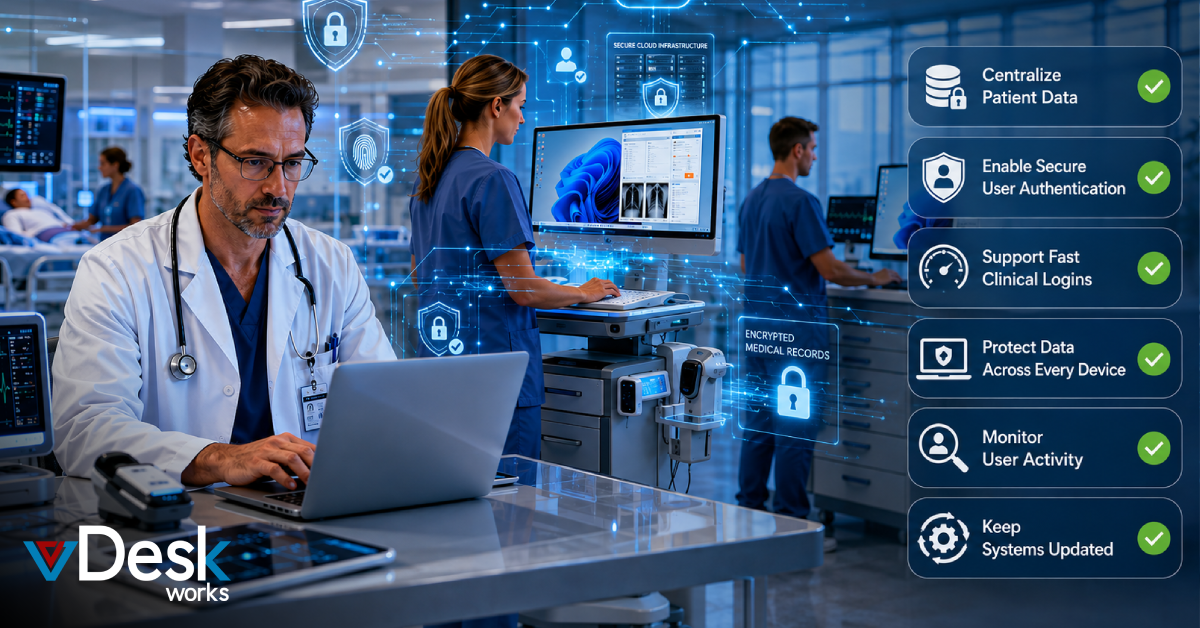
Implementing VDI requires more than simply virtualizing desktops. Hospitals should follow a structured checklist to maintain HIPAA compliance and improve operational efficiency.
1. Centralize Patient Data
Patient information should remain inside a secure data center rather than individual computers.
With vDeskWorks, medical records, applications, and files remain centrally stored, reducing the risk of data loss if an endpoint device is damaged or stolen.
2. Enable Secure User Authentication
Every healthcare professional should verify their identity before accessing hospital systems.
A secure VDI environment should include:
- Multi-factor authentication (MFA)
- Strong password policies
- Role-based access
- Secure login sessions
This helps prevent unauthorized access to sensitive patient information.
3. Support Fast Clinical Logins
Doctors and nurses often move quickly between departments.
A hospital VDI solution should allow users to reconnect to their existing desktop session without restarting applications or reopening patient files.
This saves valuable time during emergencies and improves patient care.
4. Protect Data Across Every Device
Many healthcare organizations now support mobile devices and Bring Your Own Device (BYOD) programs.
Since virtual desktops keep data inside the server environment, no confidential information remains on personal laptops, tablets, or smartphones.
Even if a device is lost, patient information stays protected.
5. Maintain Continuous Backup and Data Preservation
Healthcare organizations cannot afford downtime.
A HIPAA-ready VDI platform should provide:
- Centralized backup
- Disaster recovery
- Secure data preservation
- Business continuity
vDeskWorks stores healthcare data securely inside centralized environments, ensuring medical records remain available even during local hardware failures.
6. Keep Systems Updated
Instead of updating hundreds of hospital computers individually, IT administrators should deploy patches, software upgrades, and security updates from one centralized platform.
This reduces maintenance time while improving overall security.
7. Monitor User Activity
Hospitals should maintain complete visibility into system access.
Activity monitoring helps administrators:
- Track user logins
- Monitor resource usage
- Review security events
- Generate audit reports
- Detect unusual activity
These logs simplify compliance reporting and strengthen hospital security.
Benefits of vDeskWorks for Healthcare Organizations
vDeskWorks provides healthcare providers with a secure virtual desktop platform built for today's growing medical environments.
Some of its key advantages include:
- Secure centralized patient data storage
- Easy access to Electronic Health Records
- HIPAA-compliant virtual desktop environment
- Remote healthcare access for authorized staff
- Cloud, on-premises, and hybrid deployment options
- Centralized IT administration
- Secure BYOD support
- Simplified software management
- Better disaster recovery
- Predictable IT costs
Top Healthcare VDI Solutions Compared
Several vendors offer desktop virtualization for healthcare. Each platform focuses on different business needs.
VMware Horizon
VMware Horizon is widely used by large hospitals because of its mature virtualization features and strong enterprise management capabilities. However, deployment and licensing can become expensive for smaller healthcare providers.
Citrix DaaS
Citrix provides excellent remote application delivery and supports complex healthcare environments. Although powerful, it often requires specialized administration and higher implementation costs.
Microsoft Azure Virtual Desktop
Azure Virtual Desktop works well for organizations already using Microsoft Azure. It offers cloud scalability but depends heavily on Microsoft's cloud ecosystem and Azure management expertise.
Amazon WorkSpaces
Amazon WorkSpaces delivers cloud-based desktops with flexible scaling. It suits organizations already operating within AWS but offers fewer healthcare-specific management features.
vDeskWorks
vDeskWorks combines security, centralized management, healthcare compliance, and deployment flexibility into one platform. Organizations can deploy it on-premises, in the cloud, or through a hybrid environment while maintaining secure access to patient information and simplifying IT management.
How vDeskWorks Supports Telemedicine
Telemedicine continues to expand across healthcare.
vDeskWorks enables healthcare professionals to securely access patient information while working remotely. Doctors can review medical records, conduct virtual consultations, monitor patient information, and collaborate with specialists without compromising security.
The platform also supports secure access from approved BYOD devices, helping hospitals extend care beyond traditional clinical settings.
Why Healthcare Providers Are Choosing vDeskWorks
Healthcare organizations are expected to deliver faster care while protecting increasingly sensitive patient information.
vDeskWorks helps hospitals achieve both goals by offering:
- Secure centralized virtual desktops
- Faster access to clinical applications
- Simplified compliance management
- Flexible cloud and hybrid deployment
- Reliable remote healthcare access
- Lower IT maintenance costs
- Better scalability for growing hospitals
Whether you're managing a small clinic or a large multi-location hospital, vDeskWorks provides the flexibility and security needed to support modern healthcare operations.
Conclusion
As hospitals continue their digital transformation, implementing VDI for Hospitals has become more important than ever. A secure virtual desktop infrastructure improves patient data protection, simplifies HIPAA compliance, reduces IT complexity, and gives healthcare professionals fast access to the tools they need.
With centralized management, secure remote access, telemedicine support, and flexible deployment options, vDeskWorks helps healthcare organizations build a reliable virtual desktop environment that supports both patient care and business growth.
 Emma Carson