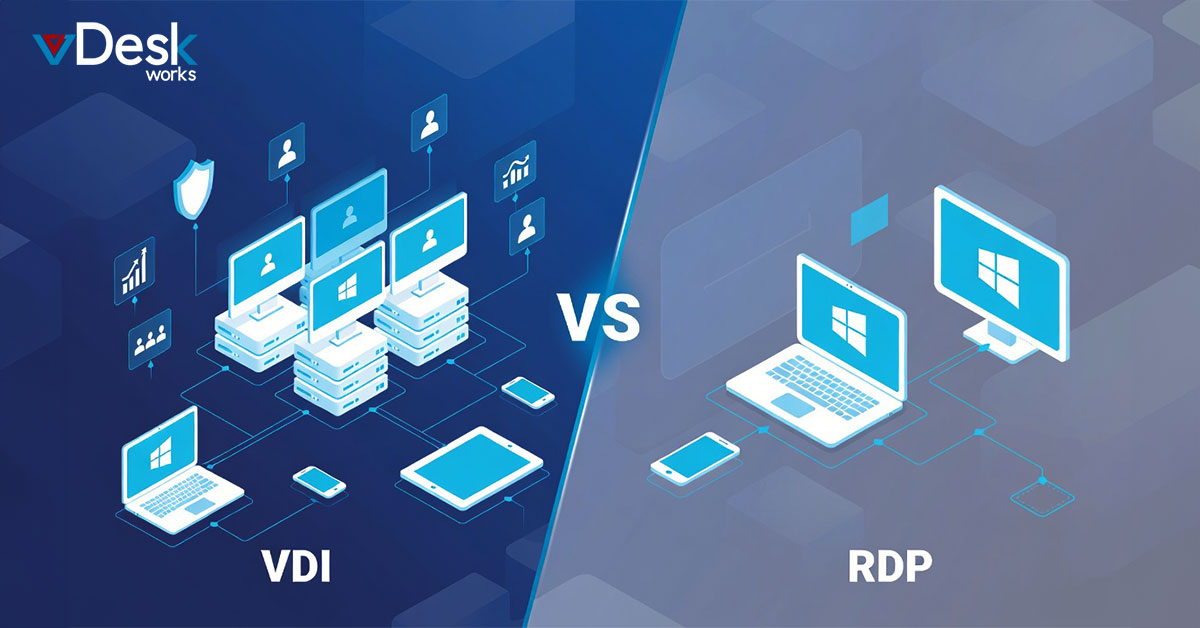
Virtual Desktop Infrastructure or VDI runs virtual machines on really powerful servers in a data center. This gives each user their Virtual Desktop Infrastructure or VDI desktop to work on which can be just for them or shared with others. The good thing about Virtual Desktop Infrastructure or VDI is that it is very secure because all the important data stays on the servers in the data center and not on the devices that people use to access Desktop Infrastructure or VDI. This means that if someone loses their device the data will still be safe.
The people in charge of the computers or IT admins like Virtual Desktop Infrastructure or VDI because they can control everything from one place. They can easily update the software fix problems. Make sure everyone is following the rules. Virtual Desktop Infrastructure or VDI also lets people use any device they want to access their desktop, which's great for industries, like finance or healthcare that have a lot of rules to follow.
However setting up Desktop Infrastructure or VDI the traditional way can be very expensive. You need to buy a lot of hardware special software called hypervisors, storage space and licenses. And that is not all. You also need to make sure the network is working well so that everything runs smoothly and does not slow down.
Exploring RDP: Simple Remote Access
RDP is a way for people to connect to a Windows computer from else. This computer can be right in front of them. It can be somewhere far away. When they connect they can see the computer screen. Use the computer like they are sitting right in front of it.
Setting up RDP is pretty easy. Does not cost a lot of money. In fact people who have Windows already have RDP so they do not have to pay anything extra. RDP is really good for people who need to fix computers for groups of people who work together or for people who only work from home sometimes.
RDP does not use up a lot of internet bandwidth so it works well even if the internet connection is slow. People also like RDP because it looks and feels like their computer desktop.
However RDP has some problems. For example it does not work well when a lot of people are trying to use it at the same time. RDP is also not very secure because if the computer that people are connecting to gets hacked then all of the connections are not secure.
Additionally RDP is not very flexible so it can be hard for big organizations to manage all of the connections and make sure everything is working correctly. RDP is a tool for some people but it is not the best choice for everyone especially, for big groups or organizations that need a lot of security and flexibility.
Key Differences: VDI vs RDP Head-to-Head
When it comes to security Virtual Desktop Infrastructure is a choice because it uses isolated Virtual Machines and stores data in a data center. This is safer than Remote Desktop Protocol because it does not put the host at risk.
Virtual Desktop Infrastructure also works better because it can handle a lot of work at the time and it can use special computer parts to make graphics work faster. On the hand Remote Desktop Protocol can be slow when a lot of people are using it at the same time.
If you are looking at the cost Remote Desktop Protocol is cheaper for things.. Virtual Desktop Infrastructure is a better choice if you think you will need to do more complex things in the future.
Virtual Desktop Infrastructure is also better when it comes to accessibility because you can use it from anywhere and from any device. Remote Desktop Protocol is not as flexible.
For people who want to be able to customize things and follow rules Virtual Desktop Infrastructure is a choice because it gives you more options. Virtual Desktop Infrastructure is better than Remote Desktop Protocol, for customization and compliance.
Why Choose vDeskWorks for Superior Virtual Desktops?
vDeskWorks is a good cloud platform that lets you use virtual desktops from anywhere. It uses technology to make sure you can get to your workspace from any device you want like a PC, Mac, Android, iOS or even just a browser. You can get to your stuff easily with a web connection that works well and you can move files around and use the clipboard like you normally would. You can also use the devices that are connected to your computer like a printer.
VDeskWorks also helps keep your information private and safe. It will automatically get rid of desktops that you are not using. It changes the address that people use to get to your desktop so it is harder for someone to get in. It also has security checks to make sure only the right people can get in and it protects against attacks from bad people. VDeskWorks follows all the rules for keeping information safe like the rules, for credit cards and health information.
Features include GPU-backed performance for demanding apps, instant scalability, disaster recovery with Azure integration, centralized monitoring dashboard, remote assistance, and pay-as-you-go pricing to cut costs up to 40% while repurposing legacy hardware. Whether for remote teams, BYOD, or enterprise needs, vDeskWorks offers zero-downtime reliability, strong privacy ("No Trace, No Worry"), and effortless management—making it the smart evolution beyond basic VDI or RDP.
 Lauren King