Now with Windows 11 Support

Secure Windows Cloud Desktops for Your Entire Team

Give every employee a powerful, secure Windows cloud desktop — accessible from any device, managed from one console, protected by enterprise security.

  • Enterprise SSD servers — 2× faster than physical PCs
  • Full Windows 10/11 with all your apps
  • Centralized IT management from one dashboard
  • Zero data on employee devices — complete protection
  • Instant onboarding — new users ready in under 5 minutes
  • 100% satisfaction guaranteed · Free 7-day trial
Team working on cloud desktops in a modern office
Faster performancethan physical PCs
2×
Faster than physical PCs
5min
To onboard a new user
99.9%
Guaranteed uptime SLA
0$
Hardware investment needed
Enterprise SSD server infrastructure
Enterprise SSD Servers
High-throughput data center infrastructure
Powering cloud desktops across the globe

Cloud desktops that are faster than physical PCs

Our cloud desktops run on enterprise-grade SSD-backed server infrastructure with high-throughput connectivity, delivering desktop performance that is typically 2× faster than a standard office PC. Applications launch in seconds. Large files open instantly. Video conferencing, graphics-heavy apps, and data-intensive workloads all run smoothly — without any hardware upgrade on your end.

Keep your business data 100% secure

With vDeskWorks, all data lives in a single, secure, encrypted environment. IT administrators control exactly what users can access, download, copy, or print. Detailed audit logs track every session and action. When an employee leaves, one click revokes all access instantly — no risk of data walking out on a personal device.

Enterprise data security
AES-256 Encrypted
Zero data stored on employee devices
Complete data loss prevention built in
IT administrator managing cloud desktops
One Admin Console
Full control from a single dashboard
Provision · Monitor · Manage · Support

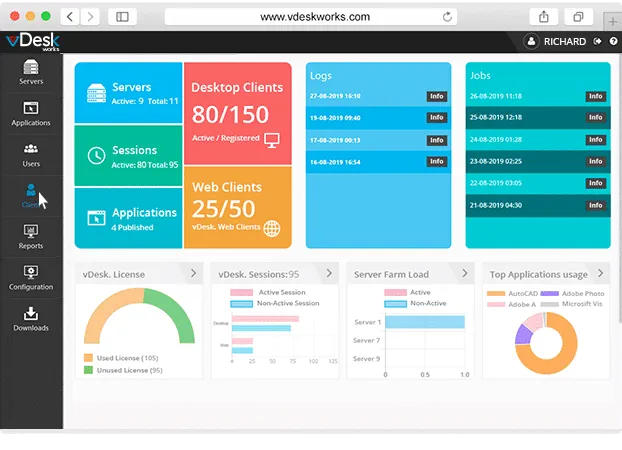
One admin console to rule all your desktops

Provision new desktops, deploy applications, enforce group policies, reset passwords, monitor session activity, and generate compliance reports — all from one place. Remote assistance and session shadowing tools allow your support team to resolve user issues without interrupting anyone's workflow.

Built for every compliance framework

Our data centers hold SOC 2 Type II and ISO 27001 certifications. We provide HIPAA Business Associate Agreements for healthcare, PCI-DSS compliant environments for financial services, and GDPR-aligned data processing for European businesses. Compliance reports and audit logs are available on demand — making regulatory reviews stress-free.

Business compliance
SOC 2 · ISO 27001 · HIPAA
Compliance-ready for healthcare, finance & legal
Audit logs available on demand
Modern minimal workspace
Zero Hardware Needed
Work from any device, anywhere
PC · Mac · Chromebook · Tablet · Phone

Zero hardware investment — the modern way to compute

No hardware to buy, no warranty to manage, and no refresh cycle to plan for. Every dollar that previously went into PC procurement becomes an operational expense that scales with your actual usage. New employees are productive from day one — their desktop is ready before they arrive at their desk.

Plans

vDesk Plans – Feature Comparison

Choose the plan that fits your team's needs — from essentials to full enterprise performance.

Feature vDesk Standard $0.00 Due Now $29.98 Save 50% on
Annual Billing
Most Popular vDesk Power $0.00 Due Now $42.50 Save 50% on
Annual Billing
Start Free Trial Start Free Trial
Setup & Accessibility
Ready to use in minutes
Permanent user profiles
Fully managed by vDesk
Admin access
Applications & Flexibility
Pre-installed trial apps
Install select compatible apps
Install any app you want
Performance & Resources
Shared system (lower cost)
Adjustable memory, storage, speed
Good for browsing, email, documents
Run moderate apps smoothly
High performance for heavy apps
Security & Reliability
Strong protection (antivirus, antimalware, encryption)
Cybersecurity protection
Automatic daily backups
Flexible backup & recovery
Cost & Value
Budget-friendly
Start Free Trial Start Free Trial

Everything your team needs, nothing they don't

2x faster cloud desktop performance
2× Faster Performance
Enterprise SSD servers and high-speed infrastructure deliver cloud desktops that outperform most physical office PCs. Applications launch in seconds, every time.
One-click user management
One-Click User Management
Add, modify, or revoke user access instantly. Manage applications, policies, and storage for every desktop from a single admin panel — no matter the team size.
Works on any device
Works on Any Device
Cloud desktops work on PCs, Macs, Chromebooks, tablets, and smartphones. Employees use what they have — you provide what they need, from anywhere in the world.

Feature comparison with Neverinstall, Dincloud, and Ncomputing

Feature vDeskWorks Neverinstall Dincloud Ncomputing
BandwidthUn-MeteredMeteredUn-MeteredMetered
Load Balancing
Windows 7 / 8.x / 10
Linux
MAC
Capture Screenshots
Capture Keystrokes
Capture Mouse Clicks
Track Productivity
Capture Screen Video Recording
Enterprise team with vDeskWorks

"We onboarded 50 new employees during a rapid expansion. vDeskWorks had cloud desktops ready for all of them in less than a day."

Andrew H. — Head of IT, E-Commerce Company

Common questions about cloud desktops

What are cloud desktops?
Cloud desktops are fully functional Windows desktop environments hosted in the cloud and accessed by users over the internet from any device or browser.
How many cloud desktops can vDeskWorks support?
vDeskWorks scales from small teams of 5 to large enterprises with thousands of users. Infrastructure scales automatically — no manual capacity planning required.
What internet speed do I need?
A minimum of 5 Mbps per user is recommended for smooth cloud desktop performance. Most broadband connections far exceed this requirement.
Are cloud desktops suitable for remote employees?
Cloud desktops are ideal for remote and hybrid teams. Every employee gets the same high-performance desktop regardless of their location or the device they're using.
How does vDeskWorks protect our data?
Data is stored exclusively in vDeskWorks encrypted cloud servers — never on end-user devices. AES-256 encryption, MFA, DLP controls, and session monitoring protect every desktop 24/7.
Can I try before committing to a subscription?
Yes. vDeskWorks offers a free 7-day trial with full feature access. No credit card is required and our team provides hands-on onboarding support throughout the trial.
What happens when an employee leaves?
IT administrators can instantly revoke access to an employee's cloud desktop from the admin console. All data remains securely in the cloud — nothing is stored on the employee's personal device.
Modern enterprise team using vDeskWorks

Ready to move your team to the cloud?

Start your free 7-day trial today. Full feature access. Hands-on onboarding support included.